powerSearch Pro for bbPress
GD Power Search for bbPress
Advanced search form for bbPress powered forums
Enhanced and powerful search for bbPress powered forums, with options to filter results by post author, forums, publication period, topic tags and few other things.
Latest Plugin Release
Plugin First Released
8 years, 1 month agoBasic Requirements
WordPress Multisite
Individual network websitesAdvanced search for bbPress
GD Power Search Pro for bbPress adds powerful, advanced search form, giving users fine control over the search results

Keyword Query
Add one or more keywords (to include or exclude using the minus sign), and select where to search for them: title, content or both.

Highlight Keywords
Plugin can highlight one or more keywords in the search results (both title and content), making it easy for users to go through results.

Results Sorting
Easy way to change the sort order for the results, and order by topic or reply ID, title, author name or publication date.
Plugin Video Preview
Check out the short video on how to start with the plugin quickly.
Filter the Results
The plugin has many useful filters to narrow the search results

Many Search Filters
Search using different filters to limit results to authors, search for one or more topic tags or search topics or replies only.

Forums Filtering
Search only public forums, search subscribed forums (for logged in users), or select forums to search through (with sub-forums option).

GD bbPress Toolbox Pro Filters
Support for GD bbPress Toolbox Pro plugin, and filters for features like attachments, thanks, and reports.

Topic Prefixes Filter
Support for GD Topic Prefix Pro plugin, and filter the post that have any prefix, no prefixes or selected list of prefixes.
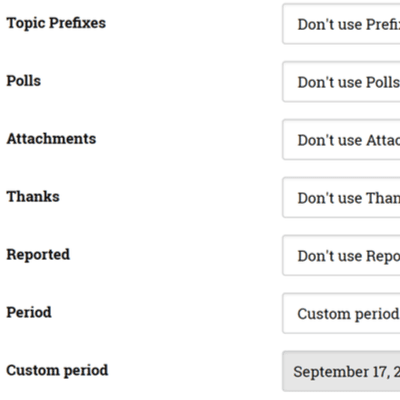
Topic Polls Filter
Support for GD Topic Polls Pro plugin and simple filter for finding topics that have a poll or no poll.
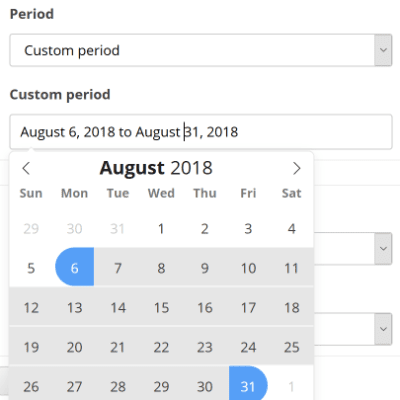
Date Period Filter
Find posts posted in the previous day, week, month or year. Or, use the date picker to select custom date period for the posts filtering.
bbPress Integration
The plugin features easy, no coding required, method to integrate into exisiting bbPress search results page and replace default form.

Power Search from Query
Leave the search page as is, and load the advanced search form only when the ?power-search argument is present in the search page URL.

Replace default Search
Replace default search form only on the bbPress search page (or loaded with the search page shortcode), not affecting the search in the widget.

Show on the results page
Show advanced search on the results page, but in the collapsed state on the top of the results. Open the collapsed form to make another search.
Settings and Tools
The plugin features various settings to limit used fields, to control the cache used to speed up the search and few more tools.

Cache and Controls
The settings include options to control cache used to speed up the search and settings to control advanced form integration into bbPress search.
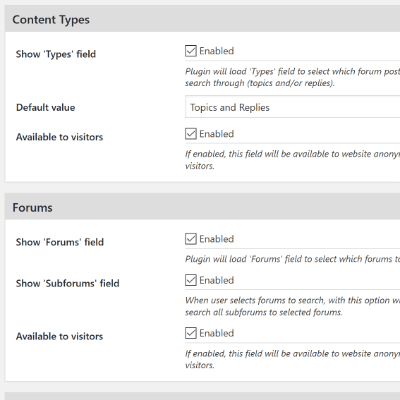
Filters Controls
The plugin has options to disable each filter, change format for some filters (users), and enable and limit filters for logged in users only.

Various Tools
The plugin has tools to clear the cached data, reset plugin, remove settings and uninstall it. And tools to export and import plugin settings.
Quick Features Overview
Here is the quick overview of all plugin features
- No coding required integration
- Uses templates that can be overriden
- Can replace default search form
- Can be displayed on the results page
- Developers friendly plugin
- Query: Include or Exclude keywords
- Query: Search in title and/or content
- Results: Ordery By and Order
- Filter: Types – Topics and/or Replies
- Filter: Topic Status (Published, Closed)
- Filter: Topic Sticky Status
- Filter: Forums – Public, Subscribed
- Filter: Selected Forums
- Filter: Post author – search by name
- Filter: Post author – select from list
- Filter: Topic Tags
- Filter: Topic Prefixes – any, none (GD Topic Prefix Pro)
- Filter: Selected Topic Prefixes
- Filter: Topics with Polls (GD Topic Polls Pro)
- Filter: Posts with Attachments (GD bbPress Toolbox Pro)
- Filter: Posts with thanks (GD bbPress Toolbox Pro)
- Filter: Reported posts (GD bbPress Toolbox Pro)
- Filter: Date period – predefined range
- Filter: Date period – custom range
All Dev4Press premium plugins share these features
Settings Import and Export
Tools to export all plugin settings into a file with JSON serialization. You can import settings from that file. This way, you can keep your settings safe or transfer settings between websites.
Dev4Press Library
Dev4Press Shared Library contains code and libraries for implementing a unified admin interface, reusable code to speed up plugin development, handling plugin settings, and more.
Regular Updates
Regular updates to fix reported bugs, fix any security issues, and enhance and improve every aspect of plugins. And using our Updater plugin, you can update directly from WordPress.
Complete Localization
WordPress's standard PO/MO translation system makes it easy to translate into any language. Dev4Press includes a GlotPress instance to handle translations for all the plugins.
Excellent Support
One of our primary goals is to provide the best support possible. This includes an active support forum and an ever-expanding knowledge base so you can get all the information you need.
Secure and Clean Code
Made with best coding practices, tested for potential security problems. We are constantly working on maintaining full WordPress compatibility and the highest level of security.
powerSearch Blog & Support Resources
Get the latest news and blog posts, access the plugin documentation and support forums.



Discover more WordPress plugins