
Payment Process
When you decide to buy a license for any Dev4Press plugins, find the plugin you want and open the pricing page. The pricing page gives you several options to choose from before you proceed to checkout, and there are a few things you can do during checkout, too.
Pricing Page
Pricing pages allow you to select the number of websites on which you want to use the plugin. Based on that selection, the pricing element will be updated to show the license price for those websites. The more websites you choose, the lower the cost per website will be.
Right now, we show prices for up to 500 websites, but if you need to use the plugin on more websites or want an unlimited license, you can use the contact form to inquire about that. We can send you a custom payment link that better fits your website’s needs. All our licenses can be purchased for unlimited websites on request. You can choose a monthly subscription license, annual subscription license, or lifetime license (only one payment, doesn’t expire).
All our plugins can be tested before purchase as a 7-day trial, and you need to check the checkbox for that before proceeding with the purchase.
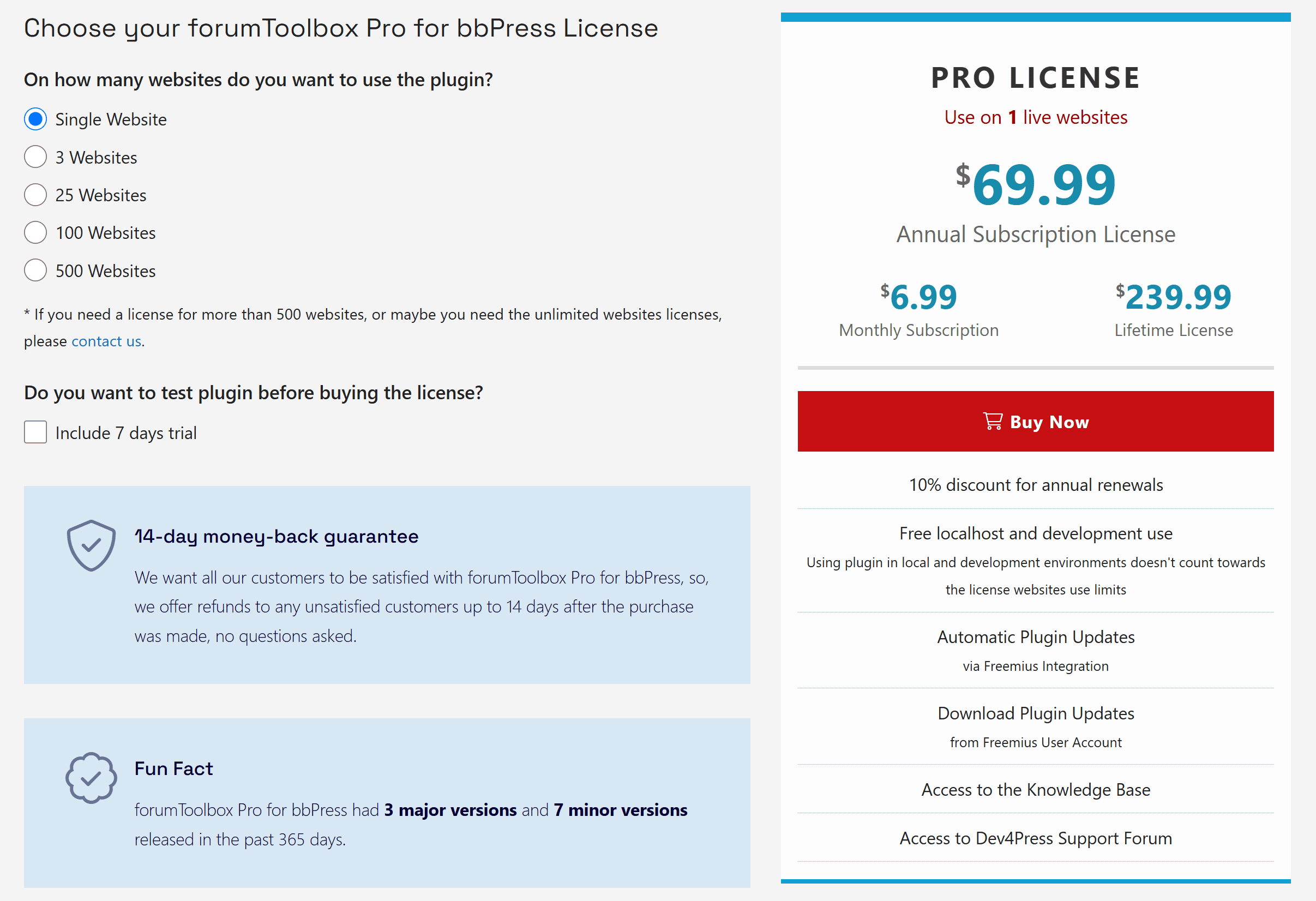
Make sure to check what is included as a benefit with each purchase, starting with a 14-day money-back guarantee (no questions asked) and more:
- Buying an annual subscription license will be discounted 10% from the full price every year.
- The plugin can be used on localhost for development purposes, which will not count towards the website’s license limits.
- While the subscription is active, the plugin will receive updates directly via the WordPress update system.
- While the subscription is active, you can download it directly from your Freemius User account dashboard.
- While the subscription is active, you can access the knowledge base and support forums.
Checkout Process
Once you decide on the number of websites and trials, click the red Buy Now button, and the checkout will appear. If logged in on the Dev4Press website, the plugin will fill in your email and name. You still need to confirm the email and, if you want, your phone number.
For billing information, you must set the country and postal code, the rest of the address is not needed. Finally, you have a choice between using a credit card or PayPal.
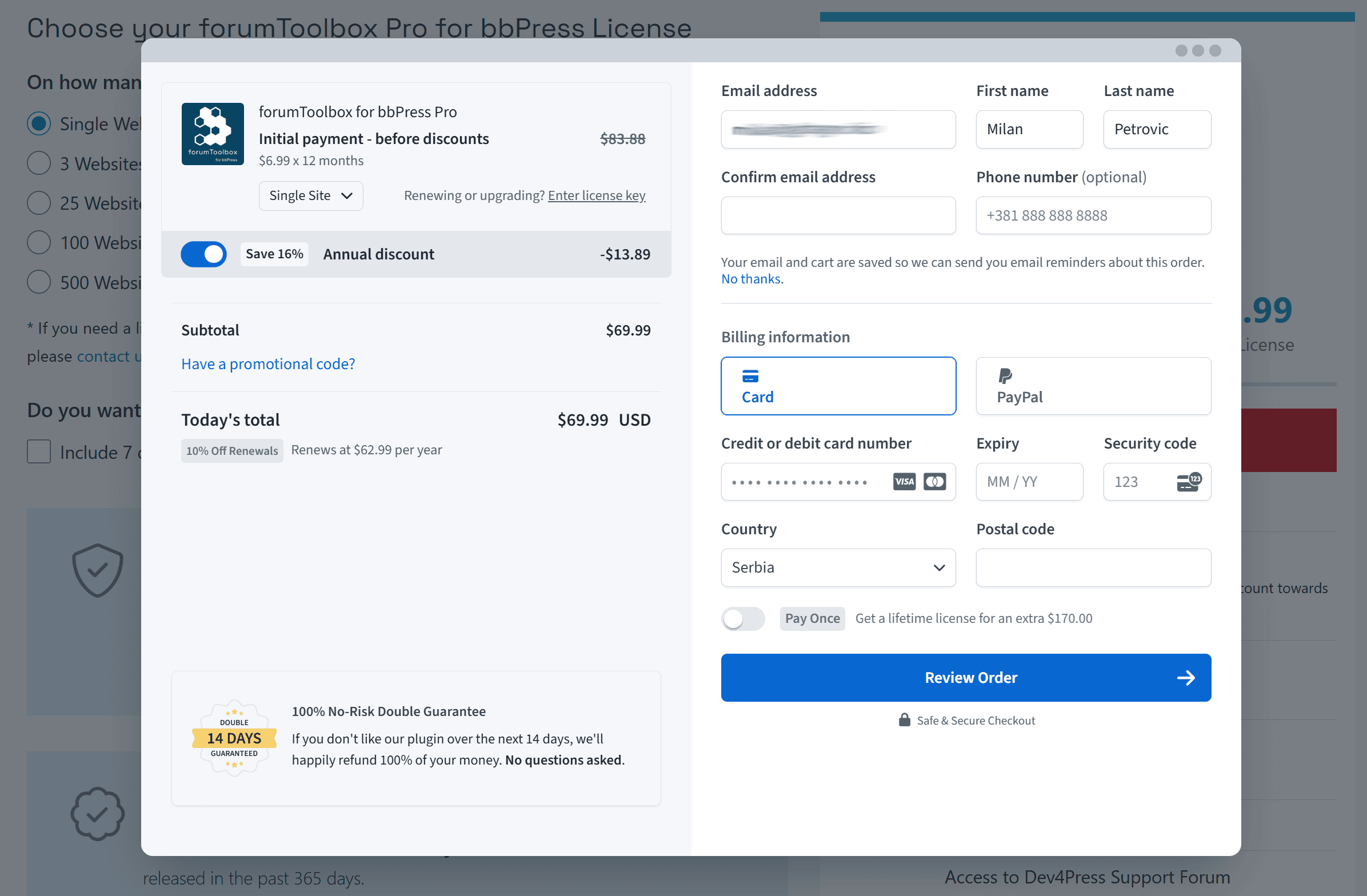
This dialog has several important options you can use to customize your purchase.
- Change the number of websites for the license. The first option, just under the plugin name, is the dropdown for the license number of websites.
- Upgrade or manually renew an existing license. If you have already purchased a plugin license but want to upgrade it, use the ‘Enter license key’ link to enter the license code. You can also upgrade the license via the Freemius user dashboard.
- Choose between a monthly or annual subscription. By default, the checkout will open with a yearly subscription. But, the toggle located under the plugin name, called ‘Annual discount,’ can be used between monthly (disabled toggle) and annual subscriptions.
- Get the lifetime license and pay only once. Above the Review Order button, you will find another toggle marked ‘Pay Once’, which includes the additional value for the lifetime license.
- Add a promotional discount coupon/code. Above the ‘Today’s total’ value, you have a link to enter the promotional code. If the code is valid, your price will be adjusted accordingly.
Making the purchase
Once you have configured everything, and depending on the payment method, you will get to review your order and confirm everything before making the payment. The payment process is usually instant or can take a minute or two. After that is done, you will get a confirmation dialog. Emails with the license code, purchase confirmation, and invoice have been dispatched. Check your inbox and confirm that you have received them. If you run into any issues with this, you can contact us, and we will be happy to help.
After you complete the process, you can view all your licenses, website activation, payments, and other details on the Freemius User Dashboard.