
Block AI Crawlers and Scrappers

In recent years we are witnessing the rise of AI (Artificial Intelligence) and LLM (Large Language Model) systems that depend on scrapping and analyzing data to be able to generate content based on the user prompts. WordPress’ websites are becoming target for the AI/LLM bots that can easily access content via REST API without the complicated scrapping of HTML.
Regardless of what you think about AI or LLM, these bots are crawling and scrapping content without your permission or control over how the data is used. And, while they are able to only get publicly available data, the control over the data is very important, and you need to decide if you want to ban AI/LLM bots from scrapping your website.
Because of the way these bots work, coreSecurity Pro is not automatically banning or restricting the bots activity, and you need to decide which bots you want to ban or disallow from your website.
Current list of AI and LLM bots
coreSecurity Pro includes regularly updated list of AI and LLM bots user agents. Every AI user agent is added to the plugin Dictionary, but it is set to Disabled, and plugin will not use these user agents in Firewall.
Assistants
In general, AI assistance only access websites on user prompt, they don’t scrape the content for generative purposes. It can be useful to have these types of bots being able to access your website, and you should not ban them.
- ChatGPT-User: this is only an assistant AI bot, and you should not block it.
- cohere-ai: this bot is suspected to be used by the Cohere chatbot to answer questions only.
Crawlers
AI Crawlers are used by the search engines that rely on getting data from the websites to help the AI Assistants with answering th questions. As for as it known about those bots, they don’t use data from AI training, only for providing answers to users.
- AmazonBot: this is Amazon web crawler that indexes search results to use for the Alexa AI Assistant.
- Applebot: this is Apple web crawler that indexes search results to use for the Siri AI Assistant.
- PerplexityBot: this is Perplexity web crawler that indexes search results to use for the Perplexity AI Assistant.
- YouBot: this is web crawler for You.com website that indexes search results to use for their AI Assistant.
Scrappers
AI Scrappers are used to get the data from the website to use it for wide range of uses, including the LLM and AI training.
- AlphaAI: this is a suspected LLM training bot.
- anthropic-ai: this is a suspected LLM training bot owned by Anthropic, but currently it is not clearly confirmed what it does and how the data is used.
- Applebot-Extended: this is a bot that is used to scrape data for use accords the Apple platforms for LLM training.
- Bytespider: this is a bot owned by the ByteDance (owners of TikTok) used for LLM training powering AI Doubao.
- CCBot: this is a Common Crawl Bot and its results are used to train various different AI and LLM systems.
- Claude-Web: this bot is owned by Anthropic, and it is used to train LLM systems.
- ClaudeBot: this bot is owned by Anthropic, and it is used to train LLM systems.
- Diffbot: this is a bot similar to CCBot and its results are used by various LLM and AI systems for training purposes.
- FacebookBot: this is a bot owned by Meta, and it is used to train various Meta run LLM systems
- Google-Extended: this is not public user agent, but it is used by Google to understand scrapping limits.
- GPTBot: this bot is owned by OpenAI and data from this bot are used for LLM training.
- ImagesiftBot: this is used to identify images, but it is part of The Hive company, and it is suspected to be used for LLM training purposes.
- Omgili: this bot is owned by the Webz.io and it’s data is used to train different LLM systems.
- OmgiliBot: this bot is owned by the Webz.io and it’s data is used to train different LLM systems.
- OpenAI: this bot is owned by OpenAI and data from this bot are used for LLM training.
When it comes to Google, they do have a bot they use for their own LLM and AI systems, but they don’t use separate scrapper for training these systems. They use regular search engine data, but only if their AI user agent is allowed on the website. So, if you don’t disallow ‘Google-Extended’, Google can use search engine data from your website to train their AI. If you disallow ‘Google-Extended’ user agent, they will not use your data to train AI. This is not affecting normal search results, according to Google.
Tracking the AI and LLM bots
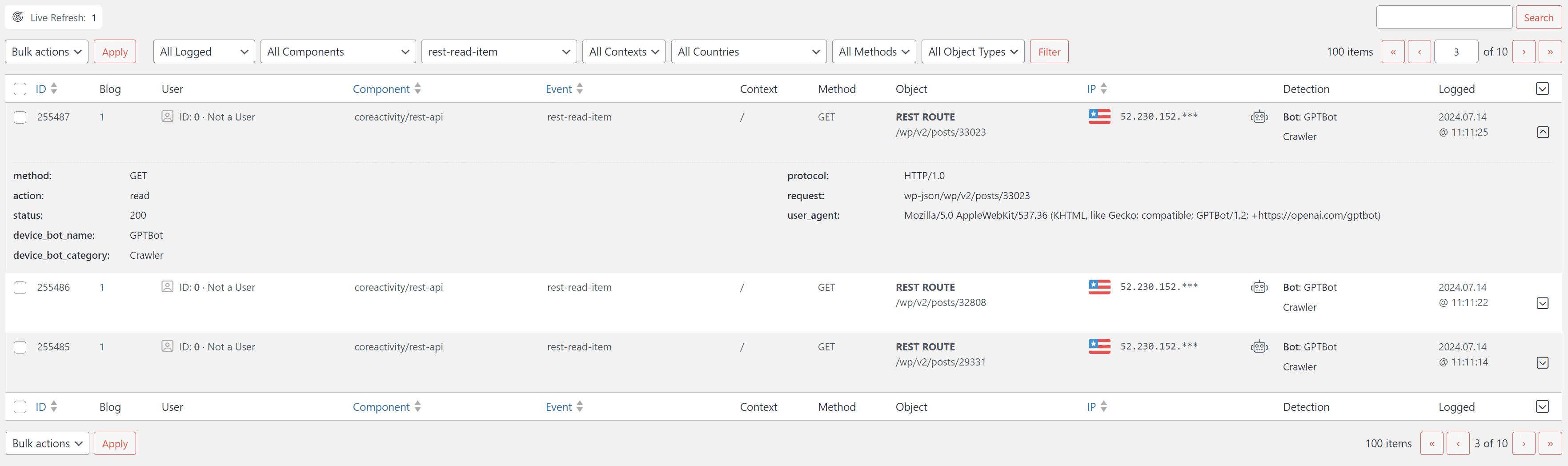
When it comes to normal search engines, they are easy to track with any of the visits analytics system out there, because every page on the website uses JavaScript tracking code to inform the tracking system on visit. But, when it comes to the AI and LLM bots, they are usually not parsing whole pages to get the content, and if they have a choice, they will prefer getting data directly. That’s where the WordPress REST API comes in.
Many bots currently (not only AI/LLM bots) are using REST API to get data from the website (Bing, Facebook). In the past few years, we have noticed increased number of requests generated by bots coming through the REST API. Most of the analytics trackers (including Google Analytics) have no direct way of tracking REST API requests, and you would need a custom code server side solution to track REST requests and report that to Analytics.
Because of that, it is not easy to see activity of AI and LLM bots, because they don’t usually appear in the Analytics results.
If you want to track REST API activity on your website, our coreActivity plugin has a set of events for this purpose, and it can track every time REST API request is made, it can identify READ/EDIT/INSERT/DELETE requests, use of authentication and more. Read requests logging is disabled by default (it can generate a lot of log entries), and you need to enable it from the Events panel.
Stopping AI and LLM bots
There are two methods to make these bots stop scrapping your website. One method is politely asking them to not scrap the data by using Robots file and trust that they will obey the Robots rules (and many will actually obey robots file). The other method is forceful, by stopping every request with the AI user agent by returning 401 status.
Robots.txt for stopping AI and LLM bots
Robots file is commonly used by search engines, search bots and other related systems to understand the limits accessing your website. ‘Good’ bots usually obey the robots.txt rules. Bigger problems are systems that ignore the robots.txt, and whatever you put in that file, it will not matter to some bots. Using Robots.txt rules is not requirement, and it is hard to enforce.
So far, all the bots listed in this article are known to obey the Robots.txt rules. We are monitoring the activity of these bots on various websites with different setups for Robots file to determine if they are obeying the rules. If you have some evidence that some of these bots are ignoring Robots file, please let us know.
If you want to stop some or all bots on these lists, simply open the Robots.TXT feature settings, and check every bot you want to set to Disallow in the Robots file.
Firewall to ban AI and LLM bots
If you want to completely stop any AI and LLM bot from accessing your website, you can use Firewall (and coreSecurity Pro has two different Firewall systems implemented) to filter out requests that match these user agents. Firewall will return 403 Forbidden errors to any matched request.
.HTACCESS Firewall
If you are running your website on Apache or LiteSpeed server, and you can use the .HTACCESS file, you will be able to use Firewall via this file. For .HTACCESS you can use 7G or 8G firewall options for fully loaded set of rules. But, if you have custom user agents in the Dictionary, and this includes AI user agents, you can use Custom Firewall settings for .HTACCESS to add user agents from Dictionary into .HTACCESS.
Here is how to use this type of Firewall to ban AI user agents:
- Go to the Dictionary page, and find all the ‘Firewall AI User Agent’ user agents. By default, all these will be set as Inactive.
- All AI user agents you want to add to firewall to ban, you need to turn their status from Disabled to Enabled.
- On the .HTACCESS Settings page, in the Custom Firewall section, enable option ‘AI User Agents from Dictionary’. This will take all Enabled AI User Agents from the Dictionary, and will make and add rules into the .HTACCESS file.
- Next tile the .HTACCESS file is updated by coreSecurity Pro, the new firewall rules will be added to it.
Firewall Feature
Firewall Feature works with any type of server, and this firewall is highly configurable, allowing you to control exact rules to use with the Dictionary you can expand.
Here is how to use this type of Firewall to ban AI user agents:
- Go to the Dictionary page, and find all the ‘Firewall AI User Agent’ user agents. By default, all these will be set as Inactive.
- All AI user agents you want to add to firewall to ban, you need to turn their status from Disabled to Enabled.
- On the Firewall settings page, make sure to have Firewall enabled, and that at least AI User Agent filter is enabled.
- If firewall is active, and you have enabled some of the AI user agents, they will not be allowed to access the website.
Is it a good idea to ban AI and LLM bots?
Well, that is not easy thing to answer, and it depends on your website content, and what you think about AI and LLM and the training on data that these bots get. The biggest issue with the way these systems works is that they don’t ask for permission to use the date for specific purposes, they are getting the data, and you need to opt-out and disallow or ban these bots for them to stop doing this.
Even with bots that are publicly stating what they do, you can’t be sure if they are really not using the data for training, because the companies running these systems are not really accountable to the public, and they can change the way they do things at any time.
At this time, it maybe a good idea to allow Assistant AI bots, and disallow or ban at least some more shady bots. Again, it is up to you and what you think is best for your content.
