Migrate installations to Freemius version of the plugin
Since January 17, 2025, all Dev4Press plugin licenses have been sold through Freemius. All downloads coming from Freemius licensing include the Freemius SDK, which handles licensing, upgrades, and plugin updates directly from the WordPress update system. Installing the Freemius integrated plugin ZIP file for the first time is the same as installing any other WordPress plugin: use the Plugins -> Add New Plugin interface. More information about the installation process is available here.
Fresh installation of the Freemius plugin version
Suppose you purchase a Dev4Press Pro plugin (for instance, SweepPress) and have never installed it on your website (a fresh installation). In that case, the process is very straightforward: download the Pro version of the plugin from the Freemius License purchase email confirmation (it contains a direct link to the ZIP file) or via the Freemius User Account panel; install the plugin using WordPress Plugins, Add New Plugin interface, just like any other plugin.
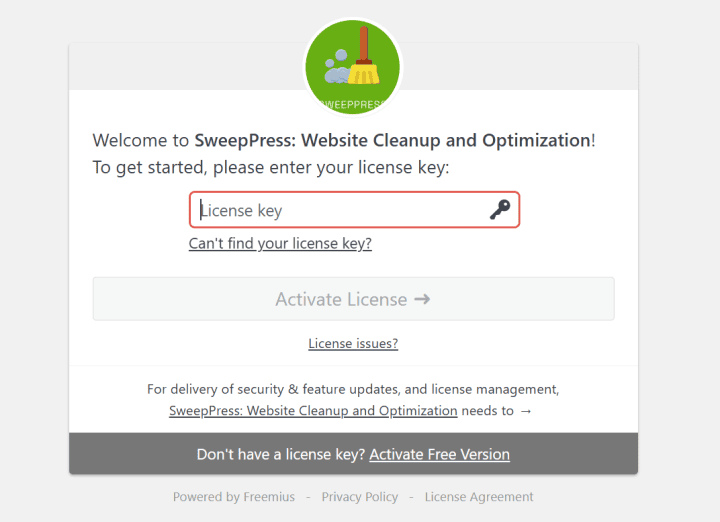
When you activate the plugin for the first time, you must add your license key, which you received in the Freemius license email. The license activation dialog is straightforward, and for plugins with Free versions (like SweepPress), you can choose to activate the Free version without the license key.
Replacing the existing plugin with the Freemius version
If you previously had a SweepPress Pro license purchased with the previous payment processor, MyCommerce, and you downloaded that Pro plugin directly from Dev4Press or via Dev4Press Updater. Now that you have a Freemius license, you must install the Freemius plugin version – and you can get it from the email you got after purchase or from the Freemius User Account. The best way to do this migration is as follows:
- On the WordPress Plugins panel, find the already installed Pro version of the plugin (SweepPress in this case).
- Deactivate the plugin, and then Delete the plugin from the same Plugins panel.
- Install the new plugin with the Freemius integration just like any other plugin, Activate it, then activate the license key as shown in the previous chapter.
Install the plugin without removing the previous version
Several Dev4Press plugins have Free and Pro versions, and when integrated with the Freemius SDK, the Pro version will have a different directory name than the Free version. For instance, the SweePress Free version has slug sweeppress, and the SweepPress Pro version has slug sweeppress-pro. SweepPress Pro, downloaded previously from the Dev4Press website, also uses slug sweeppress. That is why removing the plugin before installing the Freemius integrated plugin is essential, or you may end up activating the same plugin twice – Dev4Press and the Freemius version – which will cause issues and most likely crash the website.
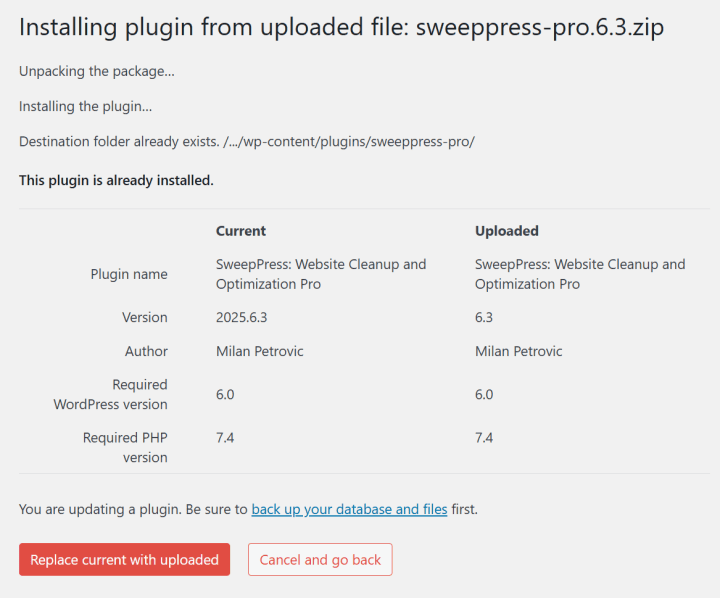
Other plugins that only have Pro versions will have the same default slugs for both the Dev4Press version and the Freemius integrated version. So, if you attempt to install the Freemius-integrated plugin version over existing installations, you can overwrite the existing installations with the new one. That will look like this: