
Multi Breadcrumbs Block
This feature requires BreadcrumbsPress Pro. View pricing and plans.
The Multi Breadcrumbs block displays available alternative paths to the current post or page. It requires BreadcrumbsPress Pro. Add Multi Breadcrumbs in the block editor, select the block, adjust its settings, and save. It requires a post or page context; the editor shows Context Missing when it does not have one.
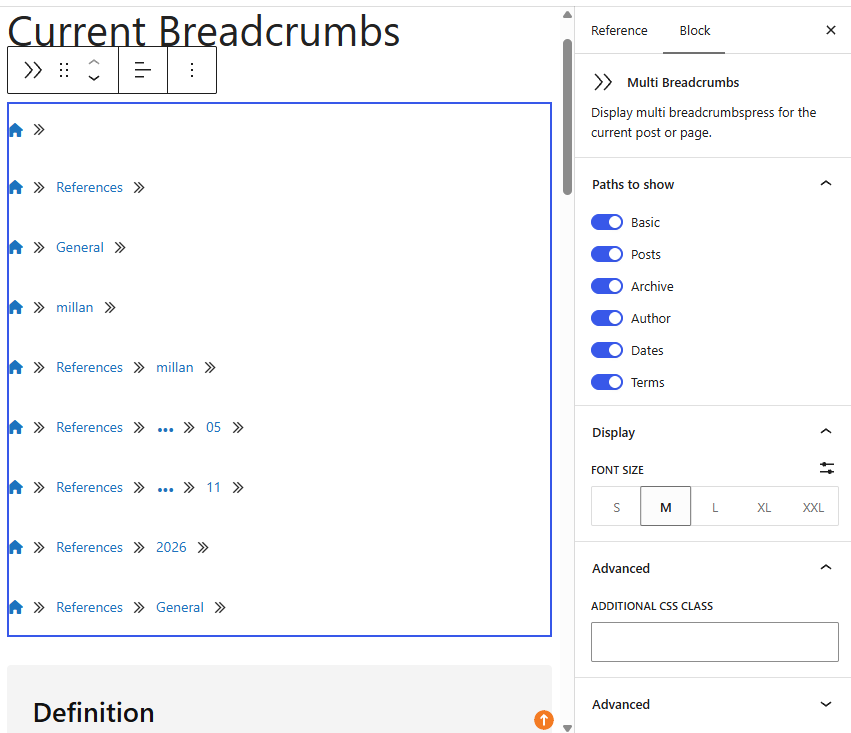
Paths to show
The following switches are enabled initially. A switch allows that kind of path; it does not guarantee the path exists for every item.
- Basic: the basic path to the item.
- Posts: a route through the configured posts page, where applicable.
- Archive: a post type archive route, where available.
- Author: a route through the author archive, where supported.
- Dates: available day, month, and year routes.
- Terms: routes through the item’s taxonomy terms.
Turn off paths that are not useful to your readers. Available paths depend on the post type, associated terms, and site configuration. Under Display, choose the font size; use the toolbar for alignment and Advanced → Additional CSS Class for custom styling.
Preview a real post or page with representative terms. If the editor cannot render the trail, check its context and the Pro license. For a single current-context trail, use the Breadcrumbs block. See Block Editor Support.