
Dashboard and Overview
Open Settings → BreadcrumbsPress in WordPress and select Overview. This dashboard brings together status information and the most useful starting points for integrating breadcrumbs.
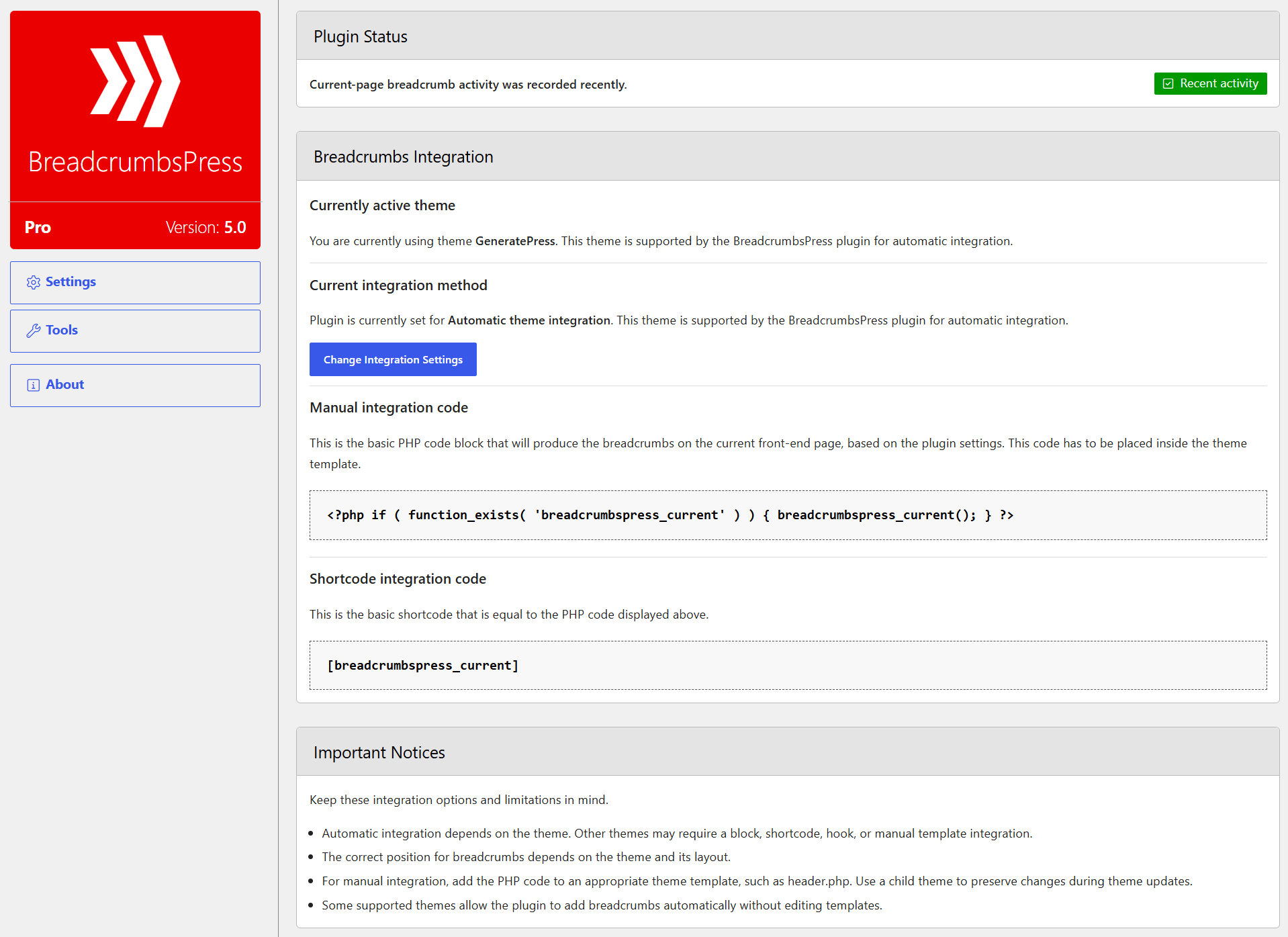
Plugin Status
The status card reports whether recent current-page breadcrumb activity was recorded. A lack of recent activity does not necessarily mean the breadcrumbs are missing: caching and other breadcrumb methods may not be reflected in this indicator. Check the actual front end as well.
Breadcrumbs Integration
This card shows the active theme, whether it is supported for automatic integration, and the current integration method. Select Change Integration Settings to choose another method or placement. See Settings for the available controls.
The card also provides a PHP example for a theme template and a shortcode for content:
<?php if ( function_exists( 'breadcrumbspress_current' ) ) { breadcrumbspress_current(); } ?>
Choose a location appropriate to the theme. If editing a theme template, use a child theme so updates do not overwrite the change. Avoid placing the same trail twice when automatic integration is also enabled.
Important Notices
The notices explain that placement depends on the theme and that unsupported themes can use a block, shortcode, hook, or manual template integration. The Lite dashboard also includes information about upgrading to Pro.
Continue to Settings to configure breadcrumbs or Tools for maintenance.