
Getting Started Panel
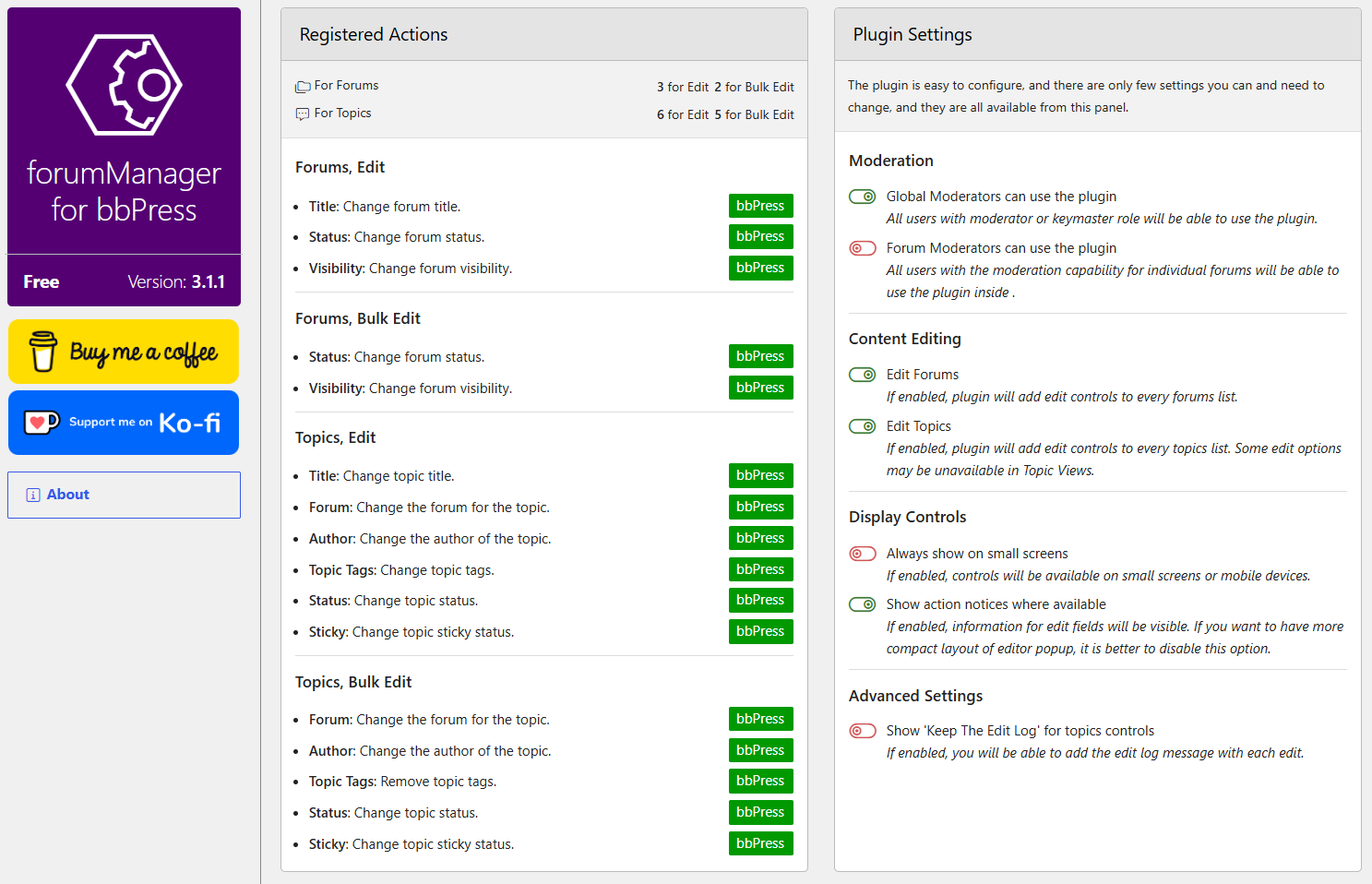
Open Settings > forumManager. The Registered Actions card lists the actions available for forum and topic editing, separated into Edit and Bulk Edit. The list can vary when topic tags are disabled or other code registers actions.
Plugin Settings
Use the toggles in the Plugin Settings card. Changes are saved when the toggle is used.
Moderation
- Global Moderators can use the plugin allows the bbPress moderator role to use the controls. It is enabled by default. Keymasters remain allowed.
- Forum Moderators can use the plugin allows users with moderation capability for individual forums to use applicable topic controls. It is disabled by default. Forum-list editing still requires keymaster or enabled global moderator access.
Content Editing
- Edit Forums enables controls on forum lists.
- Edit Topics enables topic controls, including Quick Edit on single topics. Some choices can be unavailable in Topic Views.
Both are enabled by default.
Display Controls
- Always show on small screens keeps the controls visible on small screens; it is off by default.
- Show action notices where available displays field explanations in the dialogs; it is on by default.
Advanced Settings
Show ‘Keep The Edit Log’ for topics controls adds a topic edit log checkbox and optional reason to the dialog. It is off by default. See Topic Edit Log.
Continue with Quick and Bulk Editing.