
Elementor Share Widget
The coreSocial Share widget is available in Lite and Pro with supported Elementor integration.
Place and configure
- Enable the methods you need in Networks or Internal.
- Open the page or template in Elementor and insert coreSocial Share.
- Select and reorder buttons in Networks. An explicit empty selection displays no buttons.
- Use Display for layout, colors, alignment, shape, spacing, and sizes.
- Use Counts to show counts or hide zero values. Update and test the public page.
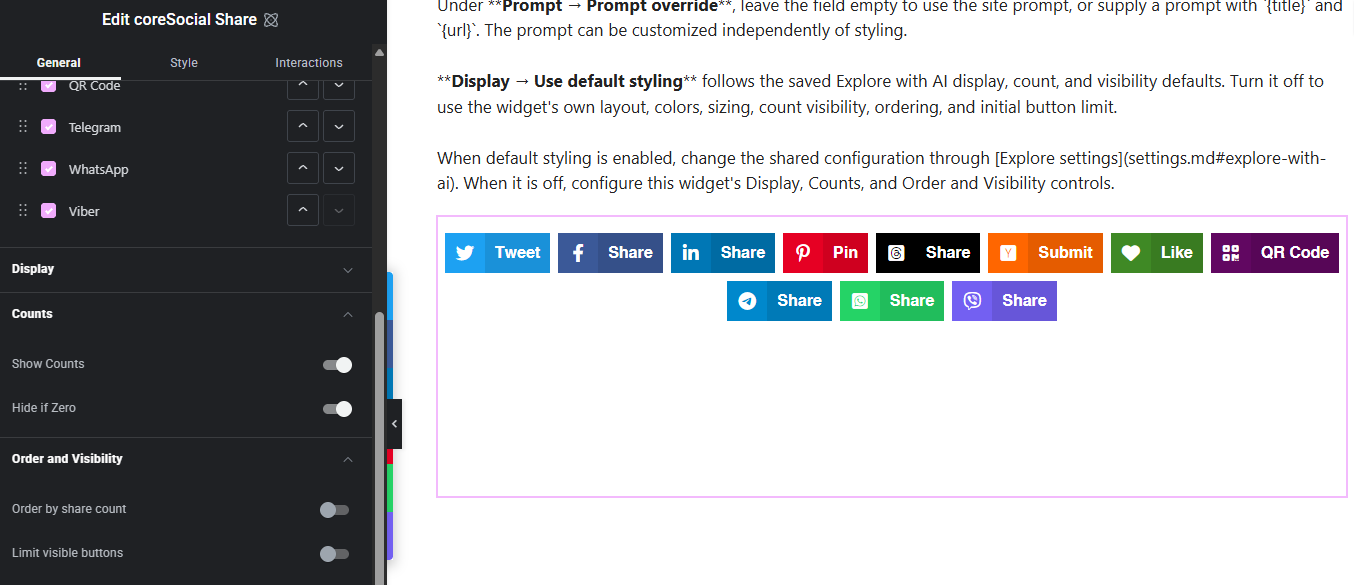
The example includes Pro sharing buttons and visibility controls. The Share widget itself is available in both editions.
The global count method determines the social count source. This widget stores its display choices and does not have Explore’s Use default styling switch.
Pro display options
Count ordering and the initially visible button limit require coreSocial Pro.
Under Order and Visibility, choose whether to sort by share count or show only an initial selection with a More button. Equal counts retain selection order. These controls do not enable disabled networks.
Context and CSS
In Additional, choose Global Context or Document Context for Page Context. Add a CSS Class if custom styling needs a selector. Verify the public target URL when using Elementor templates.
Editor buttons are inactive. Use a frontend test for link destinations, tracking, clipboard, Print, Like, and QR behavior. If a second share group appears, review automatic insertion before adding another widget.