
Understanding Counts and Logging
coreSocial stores aggregate counts and, optionally, individual action logs. These are different data sets. A button click can be counted even when the visitor does not finish sharing on the destination website.
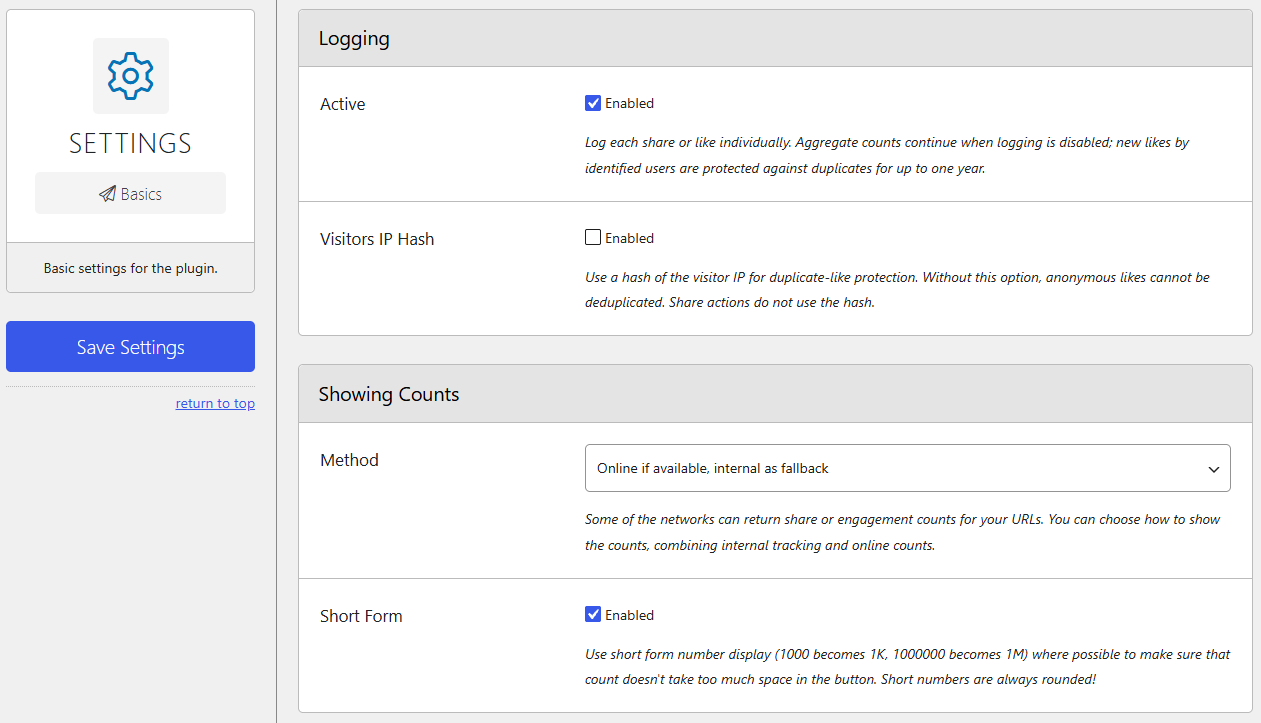
Internal and online counts
Internal counts come from actions recorded by coreSocial. They describe use of the buttons, not a verified number of completed social posts, emails, print jobs, or QR scans.
Online counts are retrieved from supported networks for a URL. Those networks may report shares or engagement according to their own API. They can differ from internal clicks and from each other. Not every network supports a usable count API.
Open Settings → Basics → Showing Counts to choose the display method:
- Online if available, internal as fallback uses a supported online source with an internal fallback.
- Combined combines internal and online values; it should not be read as a deduplicated audience total.
- Average uses an average of the available count sources.
- Online only can show zero when no usable online count is available.
- Internal only uses the plugin’s own recorded activity.
Short Form abbreviates and rounds the displayed value. Each placement also has count visibility controls; Hide if Zero can remove the number while leaving the button usable.
Background online checks
Enable global online checks in Basics and the per-network check where supported. The built-in online sources are Facebook, Tumblr, and Pinterest; Facebook also needs its API token. Configure daily or weekly frequency and whether to check only post-type URLs.
Checks are queued and processed in the background, with WP-Cron involved in running scheduled work. Queue Online Counts in Shared Items requests work; it is not an immediate provider refresh. Hosting connectivity, scheduling, provider restrictions, and the URL’s identity affect the result.
Individual logging
Settings → Basics → Logging → Active controls individual share and Explore log entries. Aggregate counts and Like records continue when this setting is off. Consequently, Share Logs can contain fewer records than the aggregate totals imply.
Log data identifies the tracked item, network, module, time, and user where available. Like processing can use the visitor’s IP-derived hash when Visitors IP Hash is enabled. Share actions do not use that hash for duplicate-Like protection. Review these settings for the data your site needs to retain.
Likes
Like buttons require Pro. Each signed-in account can Like an item once. The Visitors IP Hash setting provides duplicate protection for identifiable visitors. coreSocial uses its activity log to recognize each prior Like.
This is internal website activity, not a Like on a social network. Clearing an item’s internal activity also clears its Like records.
Explore counts {id=”explore-counts”}
Explore requires coreSocial Pro.
Explore uses internal provider-link clicks and reports Total AI Explorations separately from social shares. Counts are hidden by default. Opening Gemini’s dialog or copying its prompt is not counted; following the provider link is.
These values do not confirm that an AI read the page or that a conversation was completed. The individual logging switch also applies to Explore. See Explore with AI.
Changes and maintenance
Changing which URL is shared or excluding URL arguments can affect how activity is grouped. Stored online data can be older than a recent button click, and cached pages can display an older rendered number.
Deleting individual log records also decreases associated internal counts. Clearing an item resets its internal counts while retaining stored online values; deleting an item removes its counts and logs. Read Shared Items, Share Logs, and Tools before using those operations.
For unexpected results, follow Why are counts unexpected or not updating?.