
In recent years, we have witnessed the rise of AI (Artificial Intelligence) and LLM (Large Language Model) systems that depend on scrapping (and usually do that without explicit permission) and analyzing data to generate content based on user prompts.
Websites powered by WordPress are becoming targets for AI/LLM bots because they can easily access the content via REST API without complicated HTML scrapping. Disabling REST API is practically no longer possible since WordPress depends on it more and more, and even if you remove the convenience of REST API, bots are fully capable of scrapping HTML. Using the REST API presents another problem – tracking the activity of the bots.
Tracking the activity of AI and LLM bots
While AI and LLM scrapping has been going on for years, most WordPress website owners are unaware of this because most AI bots use REST API. If you use Google Analytics or any other visit analytics system, all of them are tracking visits to the website pages using JavaScript, and that method can’t be used to track REST API requests. So, anyone making REST API calls directly is invisible to the analytics systems. There are ways to have REST API tracked, but that involves server-side tracking implementation, and that is very rarely done.
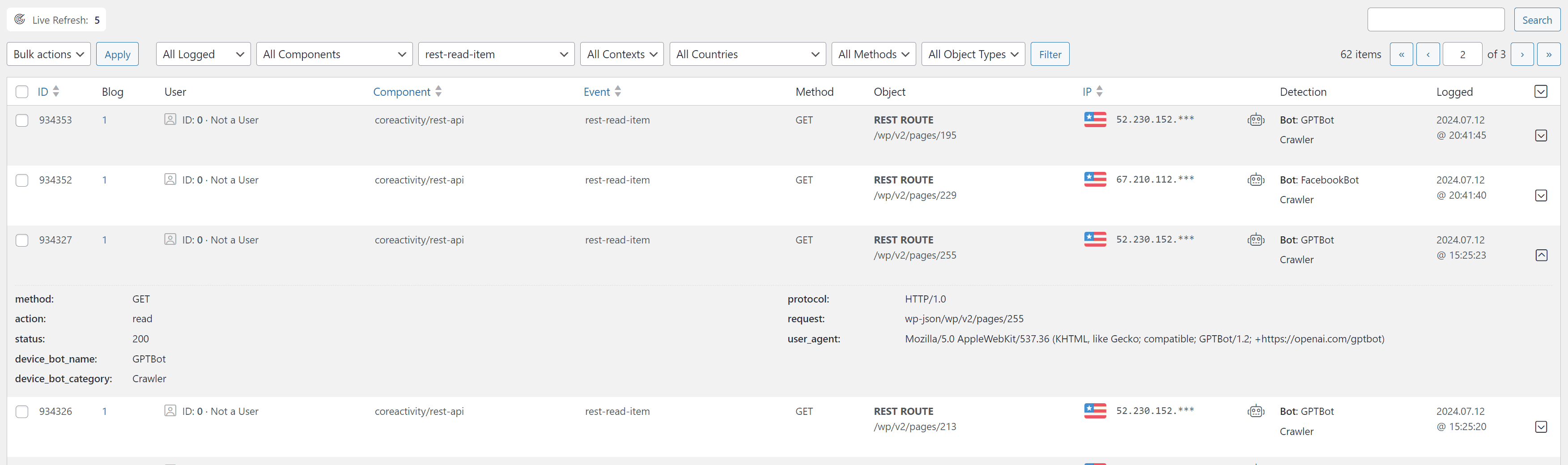
For the Dev4Press website and related websites, we use the free plugin coreActivity, which allows us to track all sorts of WordPress events (currently over 170 supported events), including 8 events for REST API. And in the past 6 months, there was a significant increase in AI and LLM bot requests to the REST API, reading all the posts. The three bots we have seen the most are GPTBot (from OpenAI ChatGPT), Bytespider (from ByteDance), and CCBot (as in Common Crawl Bot). But, in the past few weeks, the increase in AI/LLM bot activity has been massive and very concerning.
AI and LLM Bots Overview
Not all bots are the same. With AI and LLM, there are 3 types of bots, and not everyone is dedicated to gathering training data. Some bots are used to act as search engines, and some are for training purposes. But, considering that all these bots belong to big companies that are not usually very open to discussing their inner workings, it is important to take all this information with a grain of salt. We can also recognize these bots because they identify themselves with distinctive user agent strings. Still, all software browsing the internet can fake the user agent string, and we would have no way of knowing who they are. Right now, it is possible to limit the activity of AI and LLM bots, but that may very well change in the future, and we would have no way of knowing what they really do.
The first group of bots is AI Assistants, and they can be considered helpful for your website content because, reportedly, they are not scrapping anything; they are searching your website in real-time to find something on user request. So, for instance, if you are talking with ChatGPT and you ask something relevant to your website content, their ChatGPT-User bot will access your website content to answer the question.
The next group of bots is similar, called AI crawlers. They index content for search purposes only and give results to Amazon Alexa, Apple Siri, or other similar systems. To speed up the response to search queries, these large Assistants need a real-time search index to answer the questions quickly. These bots work similarly to Google Search and are helpful for your website because the website will appear in the search results and link back to your content.
Finally, the third group is AI Scrappers, whose primary purpose is to scrape content for AI and LLM training. Some of these bots belong to companies that resell scrapped content to big companies that hide their activity. Almost every day, we get news about content being sold for training purposes, and you, as the content creator or owner, have very little to say about it. There is no way to know what content is used and how.
What is the guarantee that the first two groups of AI bots will not be used for training? There is no guarantee of that, but at this time, these bots are useful for your website because they are used for user search interaction that will drive traffic to your website.
If you want to learn more about all these scrappers and see which ones are currently active, check out the user guide in Dev4Press Knowledge Base: Block AI Crawlers and Scrappers.
How do you stop AI and LLM bots from scraping your website content?
There are two ways to do this. Both rely on the fact that AI and LLM bots currently use recognizable user agent strings. An important thing to know is that both methods are not always and completely effective because both methods rely on the fact that the only way to recognize a specific bot is by the user agent, and the user agent can be faked!
Method 1: Disallow access using Robots.txt
If you know a part of the user agent string, you can set up the rules in the Robots.txt file and control which parts of the website bots with that user agent are allowed or disallowed to access. While the Robots file is a great thing to have, it is essential to know that obeying the rules in this file is completely optional and not enforceable. Malicious bots will never obey the rules, and the Robots file is meaningless. Any bot can change the user agent string, and the Robots rules will not apply to them.
But, with the big search engines (Google, Bing…), you can rely on the fact that they will obey the Robots file, and you can set up boundaries where specific bots are allowed or not on the website. At this time, all the AI and LLM bots are reportedly obeying the rules in Robots file, and if you add Disallowed rules into your website Robots.txt file, these AI and LLM bots will stay away from your website. We will have to wait and see whether that will change in the future, but for now, disallowing access via Robots file works.
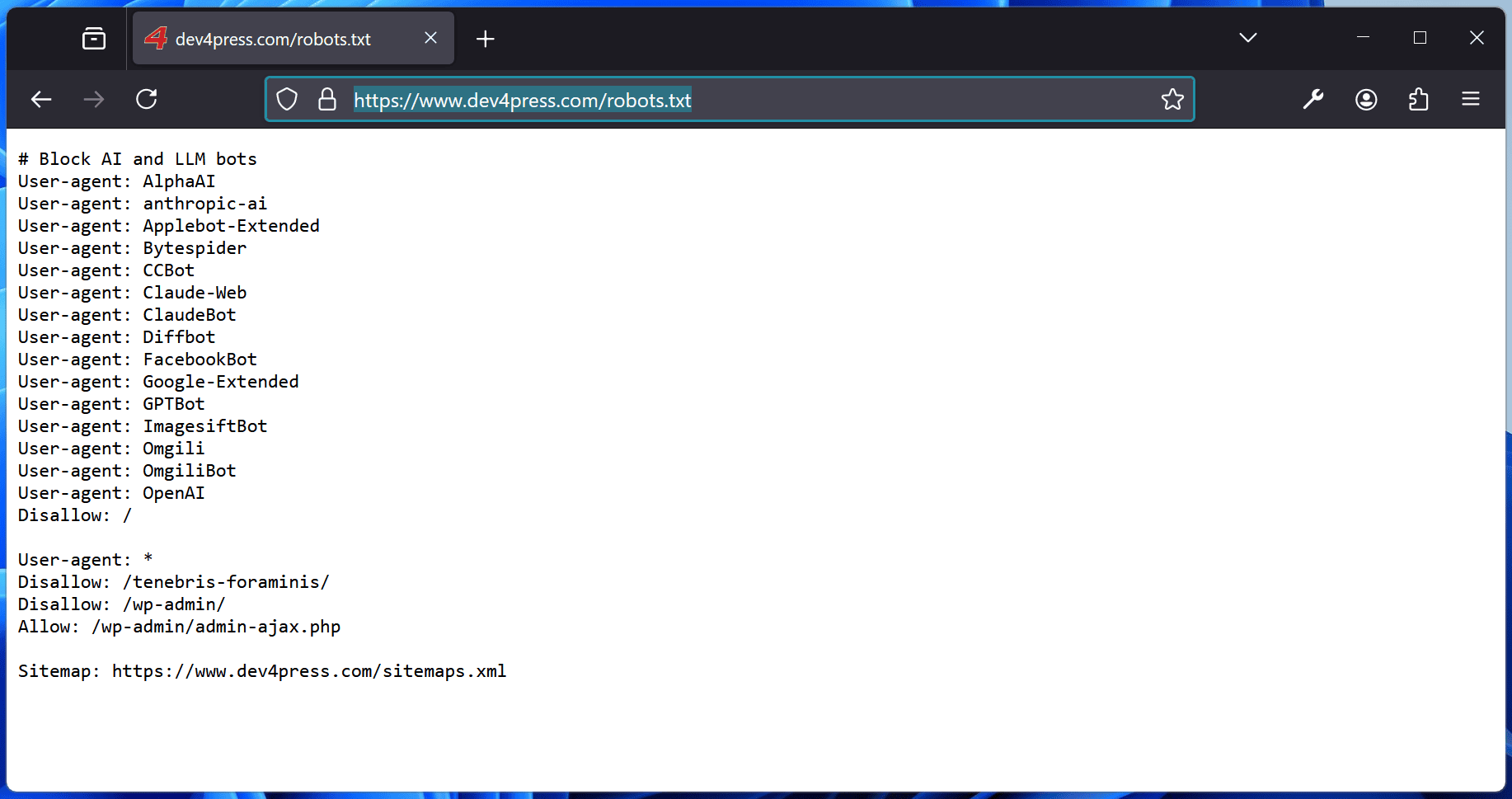
For example, you can check out the Robots file on Dev4Press. The Robots.txt file used on Dev4Press is updated using the coreSecurity Pro plugin, which has 30+ security features. One of them allows you to add AI and LLM user agents to the Robots file to disallow access.
Method 2: Full access ban using a Firewall
If you want to be extra sure, you can use a Firewall and ban access to any bot based on the user agent. A firewall will completely stop the website access with the 403 Forbidden error status. Firewall filtering based on user agents is effective, and right now, it works well because AI and LLM bots have user agent strings that can be identified, and again, that may change in the future.
Firewalls can ban access based on other criteria which do not apply to these bots. Ideally, you can ban access if you know the bot’s IP address. Again, this depends on bots not changing and always using the same IP, which is usually not the case. Not to mention that one bot can have multiple instances running on different servers and having different IPs.
With coreSecurity Pro, you can set up a Firewall. It has options dedicated to the AI and LLM bots list of user agents that you can control for banning.
Should you ban AI and LLM bots?
Well, that is not an easy question to answer, and it depends on your website content and what you think about AI and LLM and the training on data that these bots get. The biggest issue with the way these systems work is that they don’t ask for permission to use the date for specific purposes; they are getting the data, and you need to opt out and disallow or ban these bots for them to stop doing this.
Even with bots that publicly state what they do, you can’t be sure if they are not using the data for training because the companies running these systems are not really accountable to the public and can change their ways at any time.
Here, on Dev4Press, we use a robots.txt file to disallow most of the AI and LLM bots, we use firewall to ban some of the bots completely, and for now, we do allow AI Assistant bots.
Let me know what you think about AI and LLM bot activity and what you do on your website regarding content scrapping for training purposes.


,%20Dev4Press&media=https://cdn.dev4press.com/wp-content/uploads/2024/07/tutorials-stop-ai-llm-bots-from-scrapping-your-website-content.png)
What about Facebook Crawler bot that is not directly AI related? What stops Facebook using results from normal crawler for AI training purposes?
Nothing, and we really don’t know how any of these companies use the data they collect. Problem is, you can’t ban everything, or you will get no traffic though search or via social networks.
Good point, transparency from Facebook, Google or Apple is very low and they can’t be forced to reveal anything, unless someone goes to court, and even then, it would take years to find out anything. AI training has gone out of hand, good thing is that we are maybe beyond the hype point, and the world will see that current AI is not as great as it was made out to be.