
Share Logs Panel
Open coreSocial → Share Logs to inspect individually stored actions. Likes are recorded in every logging mode. Share and Explore entries are recorded while individual logging is enabled in Settings → Basics. Aggregate counts can continue when logging is off, so the visible log is not necessarily a complete explanation of every total.
Read and filter entries
The table shows the network, display module, tracked item, WordPress object ID, user where available, URL, and logged time. Modules identify where an action originated, such as inline, floating, or Explore.
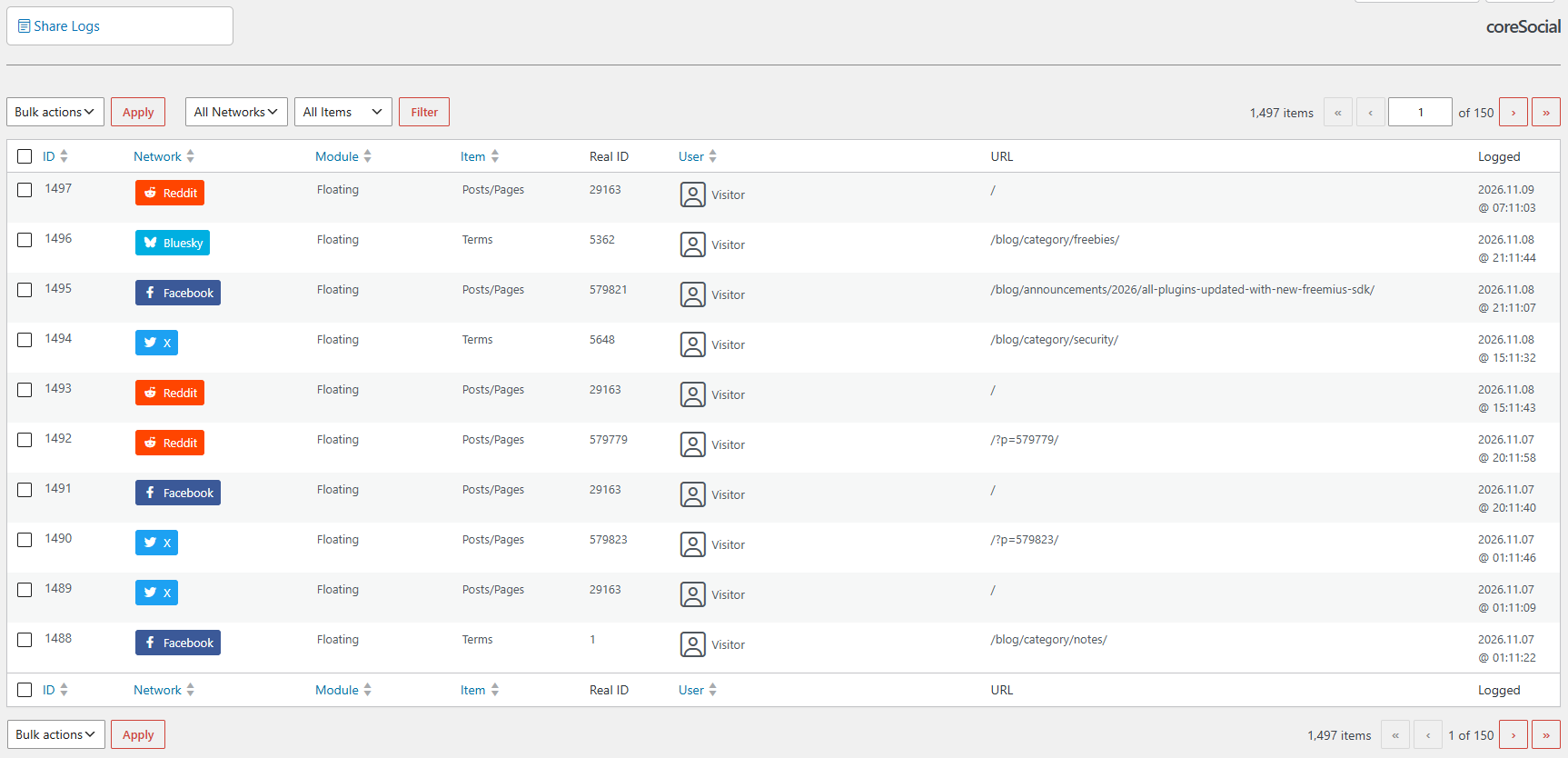
Use the network and item-type filters, URL search, and the item-ID restriction when present. The Real ID represents the underlying WordPress object; the plugin’s tracking item ID is a separate identifier. Use Shared Items to find and inspect that registration.
Network choices include enabled AI providers in Pro. An Explore log entry represents a provider-link click, not proof that the provider read the page. Read Counts and Logging before interpreting the records.
Delete log entries
The Delete bulk action removes selected records and decreases the associated internal counts for those records. It is not simply hiding a row, and it does not reset a network’s externally retrieved online count.
Keep a database backup before removing data. Logs that were never recorded because logging was disabled cannot be reconstructed from the aggregate totals. Use Tools for broader maintenance and review its export limitations first.