
The new moderation plugin is coming along nicely, and here is the new progress report that will show a bit more, including a first look at the frontend interface and a full settings panel.
The first image below shows the full settings panel, which is now expanded with all new planned features. There will be a new Report feature that aims to replace the Report feature in GD bbPress Toolbox Pro. The new Report will have more flexibility and an expanded workflow that will include commenting on reports on the front so that moderators can discuss some of the reports and better track the solution for each report. The feature ‘Censor’ will replace words with censored versions of the words using wildcard/replacement characters or custom replacements. Integration will aim to integrate the plugin with other Dev4Press plugins; for now, that is GD bbPress Toolbox Pro. The new Moderation plugin has full support for the GD bbPress Toolbox Pro Booster feature.

Group of ‘Defaults’ settings can be overridden in every forum, with hierarchical inheritance for greater flexibility. The individual forums metabox will have tabbed settings, which will look like the image below.
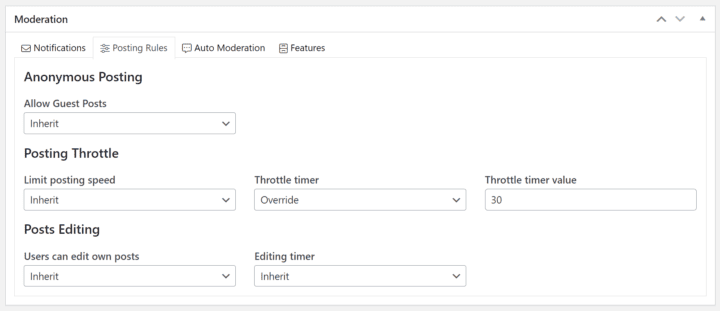
Regarding the front end, here is the first image of the Moderators panel with the header and navigation that all Moderation panels will share. The plugin will have many options to control the display of various front-end elements. And, as usual, every template added by the plugin can be replaced. This is, by no means, the final look for the interface.

Let me know if you have any moderation-related ideas, and I will try to implement them.



,%20Dev4Press&media=https://www.dev4press.com/wp-content/uploads/2024/01/moderation-settings-dev.png)