

coreSecurity Pro version 2.1 brings one big new feature for enhancing user management and adding a powerful control to disable (and later enable) user accounts with a wide range of settings. There are many more important updates, improvements, and tweaks.
The new feature, Users Administration, will expand the Users panel in WordPress (also supporting the Multisite Users panel). It will add columns with additional information and a new User Controls dialog for each user. This new dialog has several tabs with additional information and a very interesting Controls tab from where you can Disable (and later Enable) a user account. Disabling the account allows you to have the account still registered but will not allow the user to log in or change password, and you can even hide the account from being visible on the frontend; you can ban email, username, or email domain, and you can delete account description and website URL, reset password to random, or send notification to account email about the reason for disabling the account.
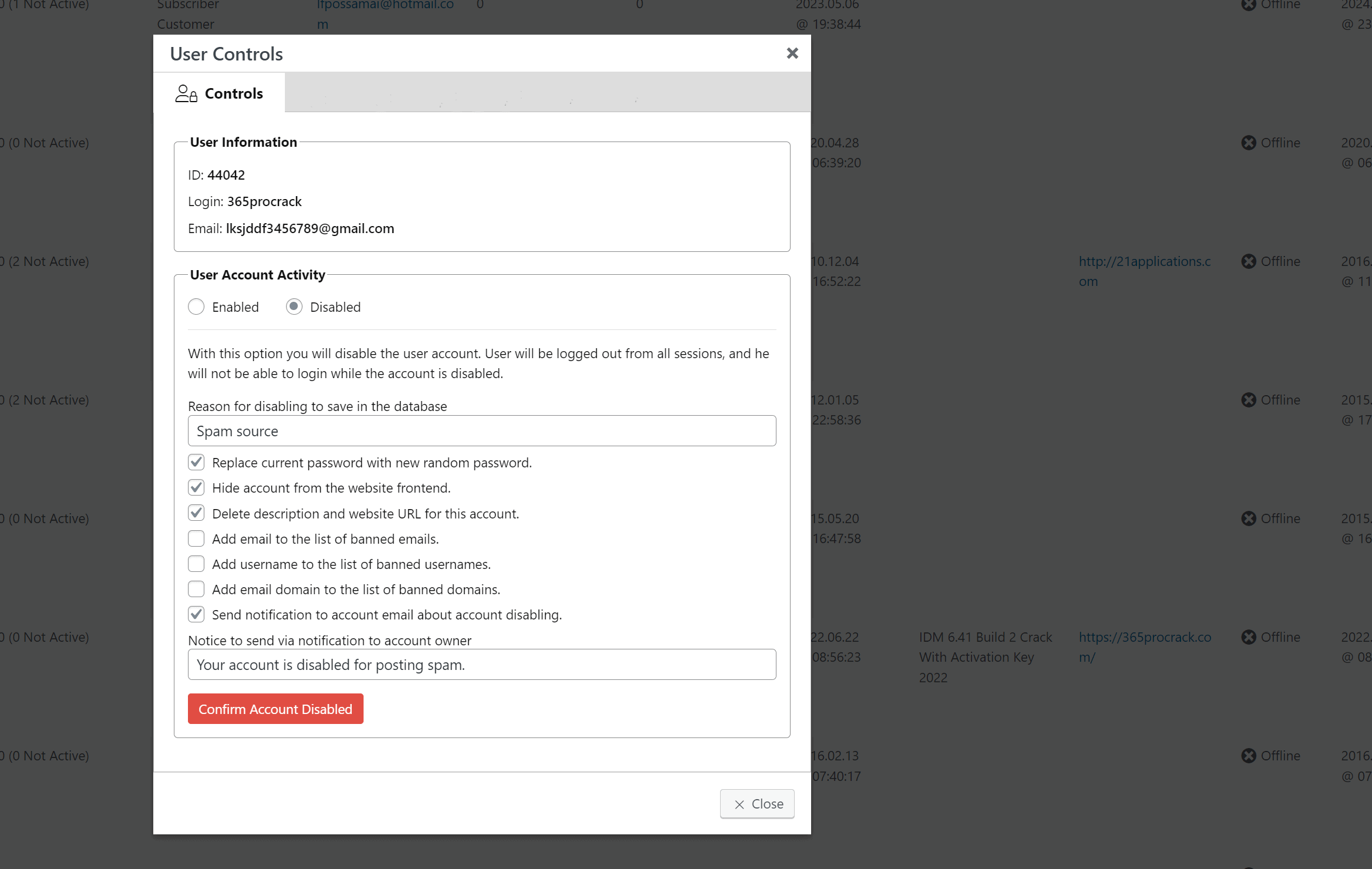
Disabled accounts can be filtered on the Users panel, and you will see different row colors and a small red icon in front of the username. Events for account disable and enable are added and logged with coreActivity. The plugin also has bulk controls for enabling and disabling users; select users you want to disable (or enable if they are already disabled) and use the Bulk dropdown where the options to Disable or Enable accounts are listed. The same settings will be available with the bulk options, too.
You can read more about the disabling of users in the knowledge base article.
Other changes in this version include various tweaks and fixes related to the shared library, improvements to the HTML template for emails, improvements to the multisite integration, and tweaks to the digest notifications. A long list of new entries is added to the Dictionary with regular expression patterns, email domains, and more to enhance antispam and registration control features.
coreSecurity Pro 2.1
3 Inspector Tools
34 Security Features
11 Security Headers
To see the list of all the changes in this version, please check out the changelog. If you find any issues with the new version, please, report them in the support forums.

,%20Dev4Press&media=https://www.dev4press.com/wp-content/uploads/2024/07/plugins-relase-corsecurity-2.1.png)