

The SweepPress plugin allows you to analyze the records in the WP options table (multisite sitemeta and all other metadata tables), detect option use, and remove old and obsolete records.
SweepPress Pro includes several panels to manage data in WordPress Options, Sitemeta, and all Metadata database tables. It can identify which options and meta keys belong to plugins and themes, track the usage for better identification, and give you information to help you decide what records to delete from these tables to regain database space and improve performance.
WordPress Options Table
The WordPress Options table (usually named wp_options) is very hard to optimize and clean properly. This table contains all WordPress settings, transient cache records, widgets, plugins, and themes settings. There are different ways to add settings to that table, and no prescribed method exists to remove old records. When a WordPress page is loaded, WordPress loads all the records from the Options table in one go using one query for all options with the ‘Autoload’ flag enabled. Most options saved in the Options table have enabled the ‘Autoload’ flag. And, even if the options are not needed, or if the option is obsolete, it will still be loaded if it is present in the table and has ‘Autoload’ enabled.
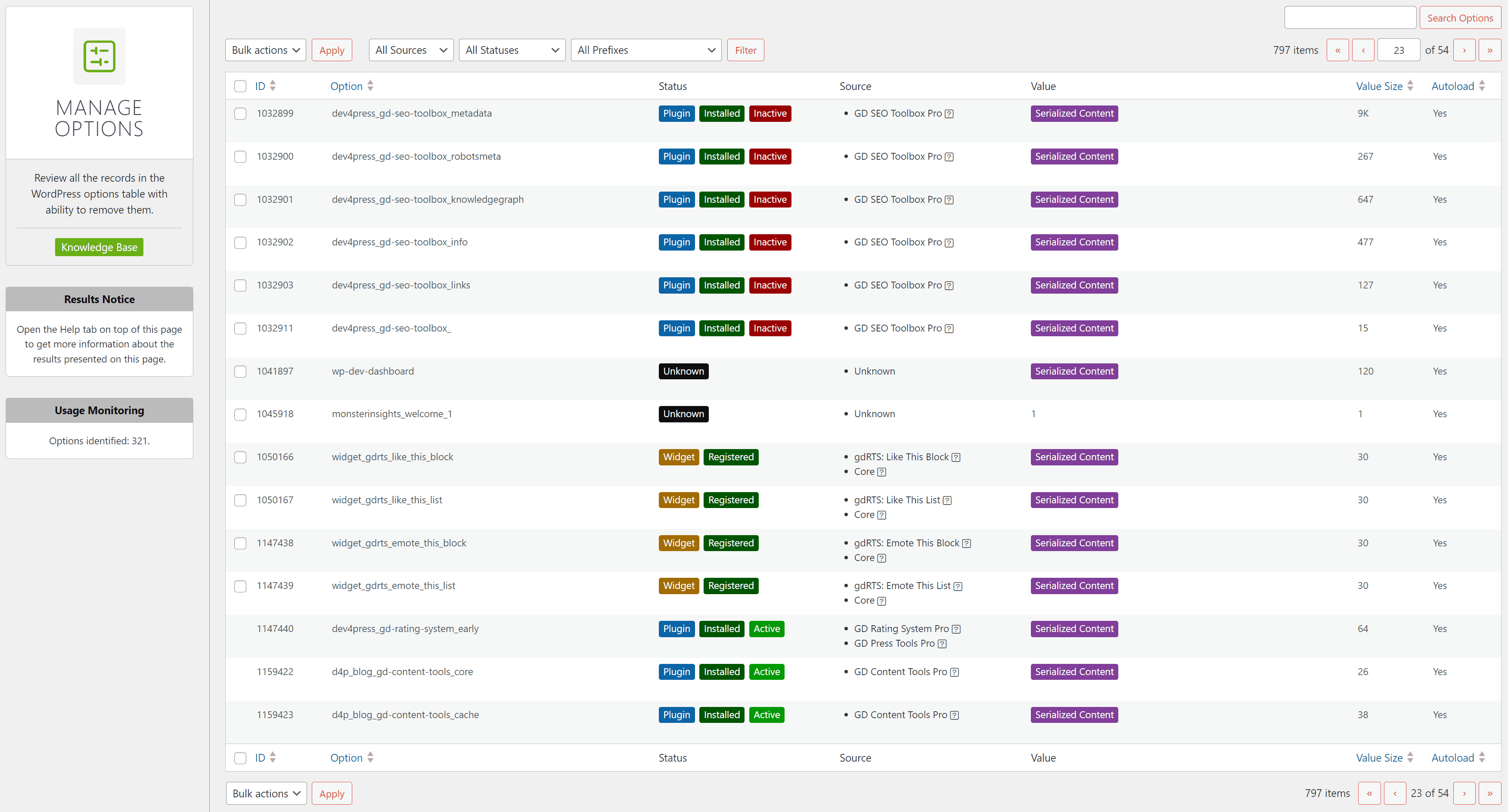
Enter SweepPress Options Management
SweepPress changes everything, with different ways to detect which options belong to which plugin or theme and to detect the usage of options by scanning the plugins and theme code or monitoring the website activity. The user guide in the knowledge base is the best place to start with information about this process. It describes all the methods the plugin uses to get the data and how it applies them to analyze the options. The results are then displayed in the Manage Options panel.
An example of how the process works is a tutorial in the knowledge base that goes through the Options cleanup process for the Dev4Press website. This tutorial presents a full analysis of results, which steps have been taken, and why to ensure the cleanup is effective. And, as always, whenever you remove anything from the database, ensure a database backup in case something goes wrong.
Options Optimization Benefits
We can review the numbers from the tutorial mentioned before. The options table had 797 records before cleanup (that are not WordPress Core options or transient cache). Most of these options had Autoload enabled. At the end of the cleanup, 306 records were removed from the table, meaning around 300 fewer records were loaded on each WordPress page load. This means that one query can be run faster because it will return a smaller data set to process. These 306 removed records took around 535KB of space in the database. With these options gone, you have freed your database from 535KB of useless data. And, since those records are not loaded on every page load, WordPress memory usage on each page load will be lower by about 1MB (database records space doesn’t translate to exact value in PHP memory usage because most of the records are objects, and they can take more memory when in use). This means that on each page load, by just cleaning up one table, you will have a faster database query and lower memory usage. These numbers may not be huge, but every small improvement counts.
Gains on every website will be different. If the website is old, where plugins and the theme have changed over time, there is a big chance that there are more options that can be removed. For newer websites, that number will be smaller.
Since I cleaned up the Options table on all my websites, I have optimized 21 websites and 21 Options tables in the past week. On average, I removed 155 records from each one. But, in one instance, I removed 730 records that took 1.8MB of database space and lowered PHP memory use by 4.2MB for each page load. This is a huge gain; for that one, website memory usage dropped by more than 5%.
Optimization Process Safety
SweepPress’s detection and usage monitoring are designed to capture as much information as possible to identify as many options as possible. Sometimes, where that is impossible, you must review the records and decide what to do. SweepPress is not 100% correct regarding options detection, but it is very reliable. The user guide covers many important topics about the process, precision, and how to decide on what to do.
Always be cautious when deciding what to delete; have a backup ready if you mess it up. If you are unsure, stop by the support forum, and we can discuss it further. In the future, SweepPress will get regular updates that will detect more and more plugins and will have better tools to improve detection and removal.



,%20Dev4Press&media=https://cdn.dev4press.com/wp-content/uploads/2024/05/tutorials-how-to-clean-up-wordpress-options-database-table.png)