
Plugin Panels Organization
coreSocial adds its own top-level WordPress administration menu. Available entries depend on the edition, account state, and whether the Setup Wizard menu is enabled.
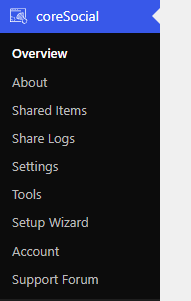
Main panels
- Overview summarizes the plugin status and sharing statistics.
- Shared Items lists the content registered for tracking and its counts.
- Share Logs lists individually recorded actions when logging is enabled.
- Settings groups the plugin’s configuration. AI Networks and Explore with AI are Pro settings subpanels, not separate top-level panels.
- Tools provides exports/imports, a recheck, cleanup, and reset/removal tools.
- Account and Upgrade describes Freemius account, licensing, and purchase actions.
- Setup Wizard appears when enabled in Advanced settings.
About
The About panel introduces the plugin and shows release information and system requirements. For the documentation’s version history, see Changelog.
Where to continue
Use the Ultimate Guide for a complete setup route. For a specific result, choose a user guide. Do not confuse the Settings configuration with the Account license actions.